Wise SVN
>>> GitHub | Unity Forum | Reddit | OpenUPM<<<
======== Prerequisites ========
- You need to have SVN command line interface (CLI) installed.
- TortoiseSVN (for Windows) comes with CLI, but needs to be added on installing
- For MacOS or Linux, select one of the options here: https://subversion.apache.org/packages.html
- Have TortoiseSVN (for Windows), SnailSVN (for MacOS) or RabbitVCS (for Linux) installed.
- Test if SVN CLI is accessible from the command line / terminal by typing "svn --version"
======== Features ========
- Hooks up to Unity move and delete file operations and executes respective svn commands to stay in sync.
- Handles meta files as well.
- Moving assets to unversioned folder will ask the user to add that folder to SVN as well.
- Moving folders / files that have conflicts will be rejected.
- Will work with other custom tools as long as they move / rename assets using Unity API.
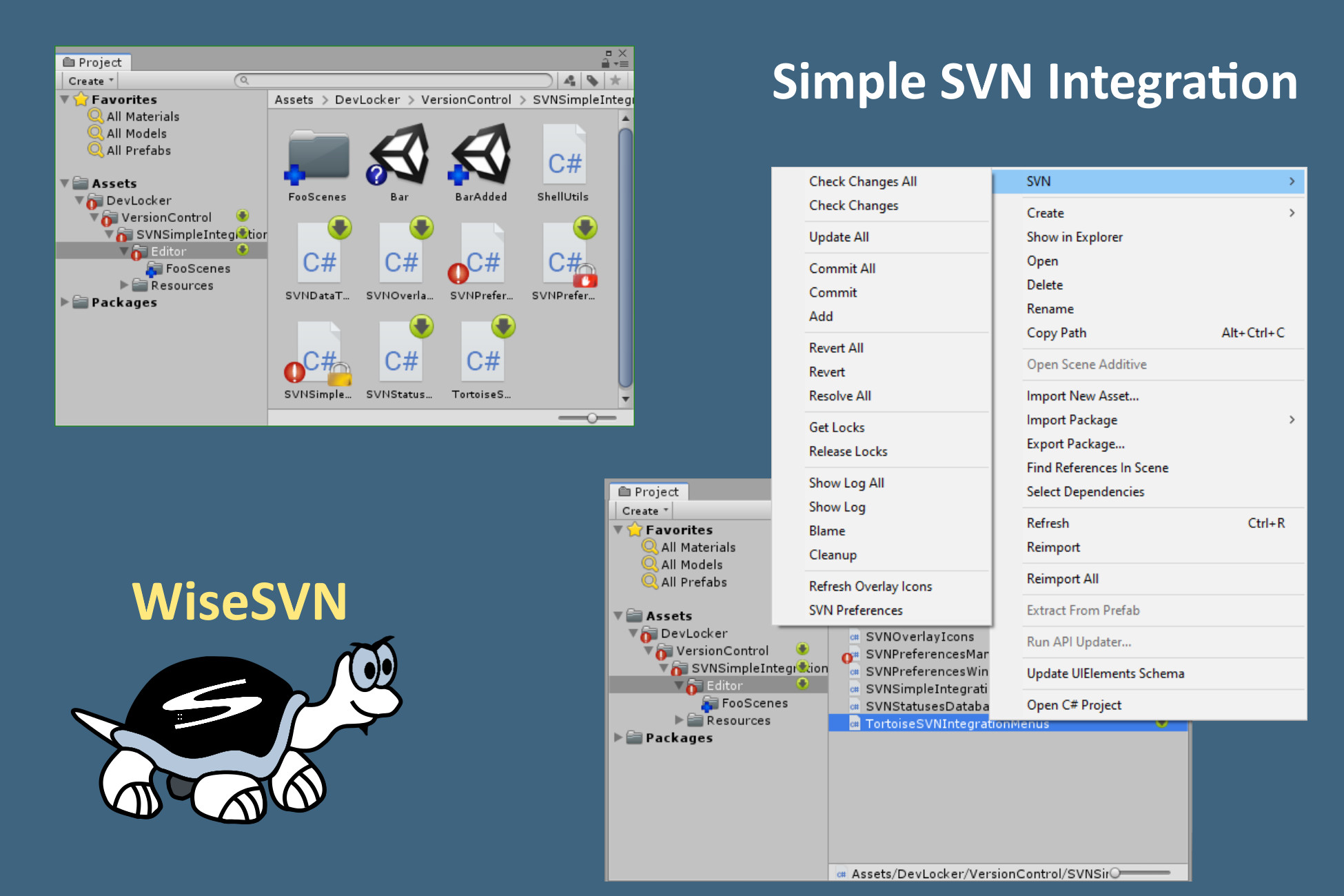
- Provides assets context menu for manual SVN operations like commit, update, revert etc.
- Show overlay svn status icons
- Show server changes that you need to update.
- Show locked files by you and your colleges.
- Show "svn:ignore" and "svn:global-ignores" icons.
- Displays warning in the SceneView when the current scene or edited prefab is out of date or locked.
- Lock prompt on modifying assets by path and type (perforce checkout like)
- If asset or its meta becomes modified a pop-up window will prompt the user to lock or ignore it.
- The window shows if modified assets are locked by others or out of date, which prevents locking them.
- If left unlocked, the window won't prompt again for those assets. Will prompt on editor restart.
- Branch Selector
- Scans for Unity projects in your SVN repository's branches.
- Lists all available branches.
- Opens Repo-Browser showing target asset in selected branch.
- Opens "Show Log" on target asset in selected branch.
- Switches to selected branch.
- Scans for conflicts (shows which branches have changes to the target asset).
- Minimal performance impact
- Survives assembly reloads
- You don't have to leave Unity to do SVN chores.
- Works on Windows, MacOS and Linux
- Simple API to integrate with your tools.
- Use WiseSVNIntegration.RequestSilence() and WiseSVNIntegration.ClearSilence() to temporarily suppress any WiseSVN pop-ups.
- Use WiseSVNIntegration.RequestTemporaryDisable() and WiseSVNIntegration.ClearTemporaryDisable() to temporarily disable any WiseSVN handling of file operations and updates.
- Use SVNContextMenusManager methods to invoke TortoiseSVN / SnailSVN / RabbitVCS commands.
- Use WiseSVNIntegration.*Async() methods to run direct SVN commands without any GUI (check `ExampleStatusWindow`).
======== Usage ========
Do your file operations in Unity and the plugin will handle the rest.
User SVN operations are available in the menu (or right-click on any asset): "Assets/SVN/..."
WARNING: Never focus Unity while the project is updating in the background. Newly added asset guids may get corrupted in which case the Library folder needs to be deleted.
Preferred workflow is to always work inside Unity - use the "Assets/SVN/..." menus. "Assets/SVN/Update All" will block Unity while updating, to avoid Unity processing assets at the same time.
This is an issue with how Unity works, not the plugin iteself. Unity says its by "design".
Release Notes
v1.5.11
v1.5.10
- Adding AssetDatabase.Refresh() after "Update All" context menu.
- Status Database now checks the root of the project for file statuses, instead of checking "Assets" and "Packages" separately. This reduces the load on the server and should make status refresh faster.
- Fix database AutoRefresh() doing endless requests if interval is too short or operations are too slow.
- Don't do move if destination file already exists.
v1.5.9
- Fixed "Git" in texts to "SVN".
v1.5.8
- Fixes issues with folders with similar names.
- Error messages improvements
v1.5.7
- Fixed invalid package definition.
- Don't monitor file operations while building player or in batch mode.
- Renaming file or folder to the same name with letters in different case is now handled gracefully in two steps.
v1.5.6
- MacOS: proper svn detection (set PATH environment variable to proper values, instead of asking the user to do stuff). Some improvements and fixes in the authentication flow.
- Improved compatibility with Ubuntu & RabbitVCS.
- Switched persistent singletons from using Resources.FindObjectsOfTypeAll() to simple constructor, like the ScriptableSingleton. Should speed up assembly reloads.
v1.5.5
- Icons are now properly excluded from the build (thanks to TerminalJack)
- Added support for SVN change lists. Previously, files / folders in changes lists wouldn't have an overlay icon. (thanks to TerminalJack)
- Added ".psb" as known extension type.
- Setting overlay icons database thread as background.
v1.5.4
- Adding icons to the scene/prefab locked overlay message.
- SVNAsyncOperation API for aggregated outputs when operation finished.
- ShellUtils now returns error code & process id. Can check if process is till alive.
- ShellUtils now properly waits for the output streams to be closed, after process died. Hope this fixes the hangs as well.
- Refactored operation error result enums so they be more consistent.
v1.5.3
- Fixed lock prompt spamming for assets that were already ignored.
- Fixed locked details were sometimes invalid (empty owner could be seen in the lock prompt).
v1.5.2
- SVNLockedOverlay now refreshes properly on status database change.
- Disable "Lock Selected" button if there are no selected entries in the lock prompt window.
- Fixed: compilation errors on Unity 2020 with split and join string functions.
v1.5.1
- Adding unicode icons to the context menu.
- Ask for confirmation when moving/renaming versioned folder (can be turned off from the personal preferences).
- Fixed error on fetching lock details, when target file is missing.
- Fixed: status database logging "UnknownError" on time out. Time out is now recognized correctly.
- Fixed: recursive externals displayed false modified "!" overlay icon.
- Adding "Progress Bar" when manually refreshing SVN icons.
v1.5.0
- Add RabbitSVN context menu support for Linux! Thanks to EmiyaSyahriel (https://github.com/EmiyaSyahriel)
- Adding authentication checks. If authentication is needed a special button is displayed in the preferences window to help user log in. Works with nested repositories.
- Adding Revert confirmation message for single files.
- MacOS support fixes and improvements.
- Improved API
- Added generic CLI context menu support (editor window to run svn commands). Can be used on Windows, Linux, MacOS.


Basic Information
- Latest Version
- 1.5.11 (08 Jan 2026)
- Publisher
- DevLocker
- Category
- Editor Extensions/Version Control
- Size
- 1.2 MB
- Price
- free
- Asset Rating
- ★ ★ ★ ★ ★ (21)
Extended Information
- Unity Versions
- 2022.3.8
- State
- Published