Node Based Dialog System
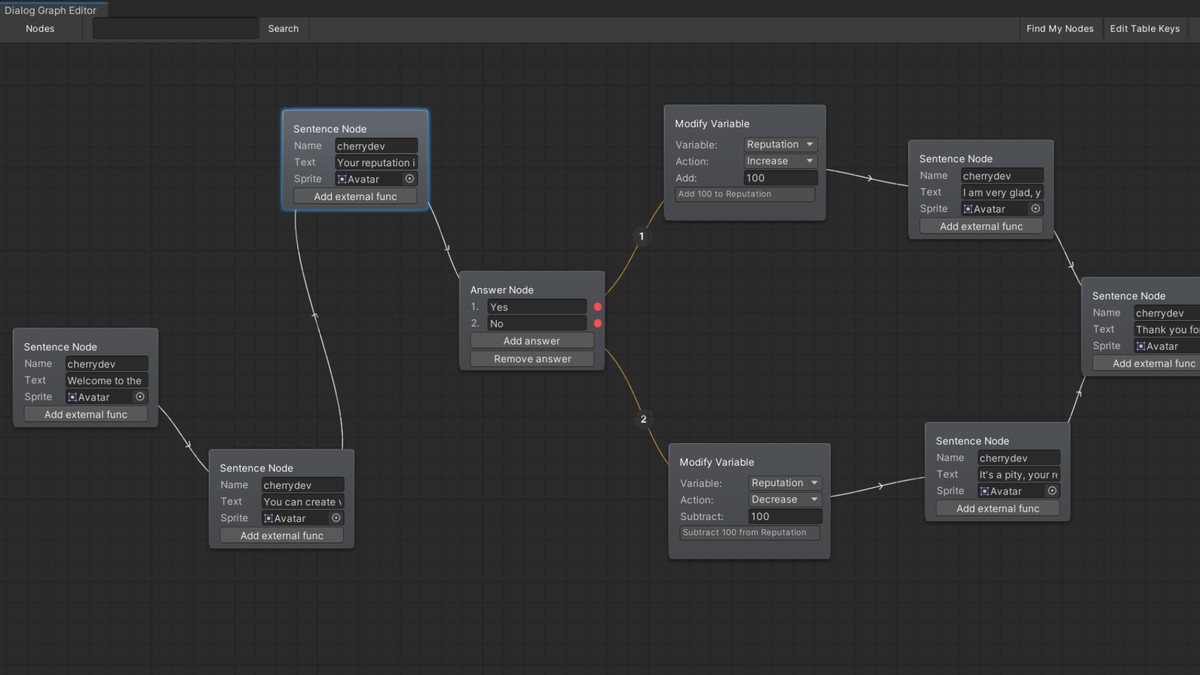
Nodes-based dialog system Unity asset is a tool that allows game developers to create branching dialog trees for their game characters easily. It is a visual editor that allows users to create and connect nodes to build conversations between characters in their game. Each node represents a piece of dialog, and the connections between nodes determine the flow of the conversation.
The asset is user-friendly and intuitive, allowing users to create dialog trees without the need for programming skills. It includes a variety of features such as the ability to display dialog options based on the player's choices
This video is a short guide to using the Node Based Dialog System: https://www.youtube.com/watch?v=oFOvop46eic&ab_channel=cherrydev
I also recommend watching the latest video describing the new features: https://youtu.be/881lzd-p9eg
Key Features:
- Visual Node Editor - Drag, connect, and organize dialog flows with ease
- Variable System - Dynamic conversations that react to game state (Bool, Int, Float, String)
- Conditional Branching - Smart dialog paths based on player choices and variables
- Timeline Integration - Seamless cutscene and scripted sequence support
- Unity Localization - Multi-language support with auto-generated translation keys
- External Functions - Trigger custom code during conversations
- PlayerPrefs Persistence - Save dialog state and variables across sessions
⭐ Please give this asset a star on GitHub if you find it useful.
🐛 Questions or bugs? Contact: olegmroleg@gmail.com
Release Notes
Version 2.2.0:
- Nodes can now have multiple parent nodes.
- Added **External Function Node** that executes a function and immediately switches to the next node.
- Updated the syntax of **StartDialog** to include two callbacks: `onVariablesHandlerInitialized` and `onDialogFinished`.
Version 2.1.0:
- Timeline integration for dialog sequences
- Complete variables system with support for: bool, float, int and string types
- Variable condition nodes for branching logic
- Variable modification nodes
- Node connection issues
- Various minor bugs and stability improvements
Version 2.0.1:
- Fixed errors that occurred on the sixth version of Unity.
- Added answer index indicators on connection lines with management options to easily identify which dialogue choices connect to which responses.
- Added events on sentence started/ended to dialog behaviour.
Version 2.0.0:
1. Localization support added using Unity's Localization package
- Setup and customization available via the new toolbar.
- (Video tutorial coming soon. See docs for full details.)
2. Toolbar and buttons added to streamline your workflow
- Localization – Set up tables, update keys
- Edit Keys – Toggle key editing mode
- Search Field – Quickly find and focus on dialog content
- Find My Nodes – Re-center the view on all existing nodes
- Nodes Dropdown – Access a list of all nodes in your graph. Click any node to instantly center and select it.
3. Undo/Redo Support
- Added Ctrl+Z for undo and Ctrl+Y for redo actions.
4. Improved controls for better usability:
Left Mouse Button:
On node + drag: Create a connection between nodesOn node: Select and move nodes
On empty space + drag: Create selection rectangle to select multiple nodes
Middle Mouse Button:
On empty space + drag: Pan/move around the editor view
Remove Connections
Right Mouse Button:
Click: Open context menu with options:Create Sentence Node
Create Answer Node
Select All Nodes
Remove Selected Nodes
5. Visual Improvements
- Refined the appearance of the Dialog Node Editor window for a cleaner and more intuitive experience.
Version 1.3.4:
- Fixed issue "When I dragged the node editor page, I lost the node I created". By adding the "Find my nodes" item to the context menu.
- Added more convenient selection rect. Now you can select multiple nodes at once by holding down button 3 (scroll) and moving the rect.
- Added "Remove Connections" items to the context menu. Removes all connections from the selected nodes.
Thanks for reporting issues :)
Version 1.3.3:
- Fixed problem with answer buttons and calling external functions.
Version 1.3.2:
- New documentation for the asset has been created. You can view it in the Documentation folder as a PDF file.
- Added the ability to bind external functions to sentence node, еhis function will be called along with the node.
- Added new setter methods to DialogBehaviour script, so that it would be possible to change parameters in the code, and not just in the inspector.
- Fixed a problem with the size of nodes when restarting Unity.
Version 1.2.2:
- Сhanged the way sentences are written. Instead of adding characters directly, the text is immediately assigned to the dialogue text and then the maximum number of visible characters are increased. This will allow you to use style tags such as <color="">, <size> and so on.
- It is now possible to have more than one keycode to switch the dialogue to the next sentence.
- Added the ability to skip a sentences. By pressing one of "nextSentenceKeyCodes" the sentence will instantly appear in full
Version 1.1.2:
- Fixed Dialog Prefab. Now you can safely use Dialog Prefab following the instructions in the video without errors.
- Fixed a problem with calling a dialog when the dialog is already in progress.
Version 1.1.1:
- Added "Open Editor Window" button for DialogNodeGraph.
- Added "Add answer" and "Remove answer" buttons for answer nodes.
- Added ability to create more than 4 answers in the answer node.




Basic Information
- Latest Version
- 2.2.0 (25 Aug 2025)
- Publisher
- cherrydev
- Category
- Tools/Game Toolkits
- Size
- 0.8 MB
- Price
- free
- Asset Rating
- ★ ★ ★ ★ ★ (14)
Extended Information
- Unity Versions
- 2022.3.62
- Render Pipelines
- ✔ BIRP ✔ URP ✔ HDRP
- State
- Published