UI Toolkit Blurred Background - Fast translucent UI Blur image
✨ This asset is part of the UI Toolkit Bundle 1. ✨
✨ This asset is part of the UI Toolkit Bundle 2. ✨
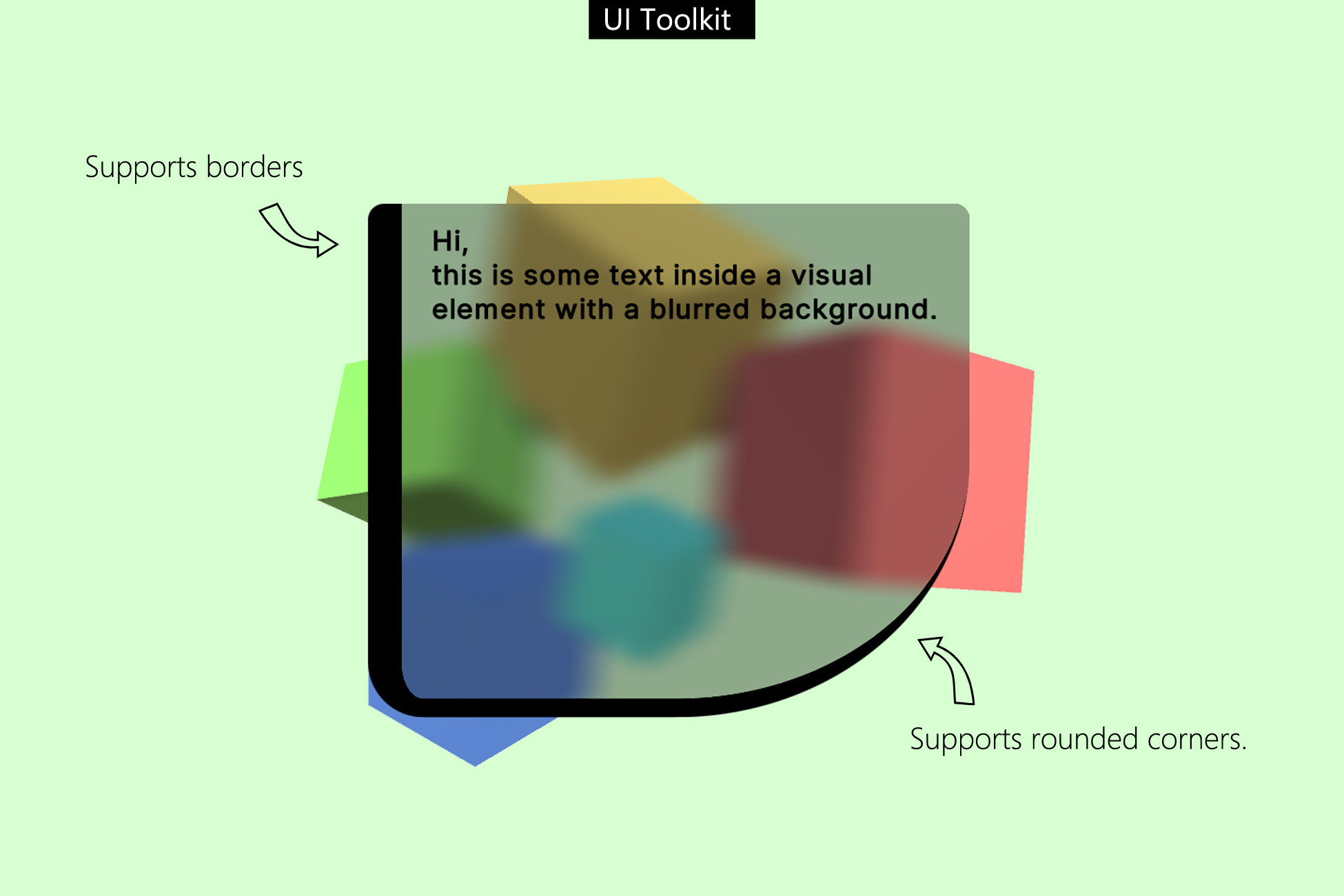
Blurred backgrounds for UI Toolkit elements.
Nicely blurred see-through UI for everyone.
✔️ Super easy to use
Adds a new visual element to your component library. No setup or coding required.
✔️ Works on all render pipelines
Built-In, URP and HDRP are supported
✔️ Examples included
Go to Kamgam/UIToolkitBlurredBackground/Examples to open the demo scene.
✔️ Mobile ready
Multiple quality settings so you can adapt it to your needs.
✔️ Full source code included
I publish this asset with full source code because as a developer I know how annoying it is to not have source code access. If you like it then please remind others to purchase the plugin. Don't just copy and paste it everywhere. Thank you ❤️
✔️ Supports Unity 2021.2+, 2022, 2023, Unity 6 (yes, it supports Render Graph) ... LTS
⚠️ UI over UI blur only in Unity 6.3+ in combination with FILTERS
For all other versions only scene contents are blurred.
PLEASE check out the manual before buying if you want UI over UI blur. There are some limitations and manual setup is required (no coding though). Check out the manual.
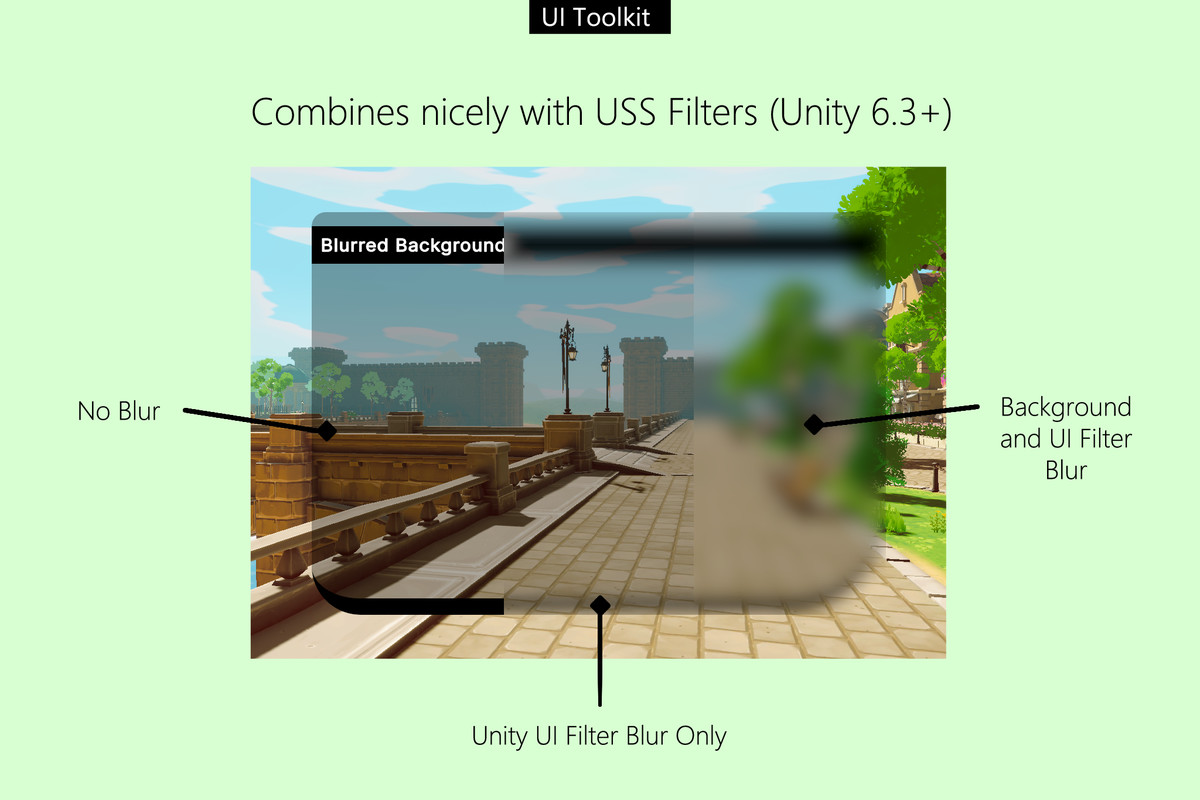
✔️ Works with USS filters (new in Unity 6.3 🥳)
In Unity 6.3 shader based filters have finally been added (yay). However, these filters (like the UI blur) do ONLY affect the UI itself and not the scene content behind it. - This means if you want to get a fully blurred look (UI and background) you still can make use of this asset. Please check out the manual on how best to use the background blur in combination with filters (TLDR: Use a low blur like 0.1 for this asset and a high blur for the new filter, done).
Things you should know (👓 please read this before you buy)
There is a manual with lots of screenshots. Please read it before using the asset.
😲️ This is NOT a UGUI or IMGUI asset. This is for the new UI Toolkit.
If you need UGUI blur then please check out my UGUI Blurred Background asset.
⚠️ You need Unity 2021.2 or higher.
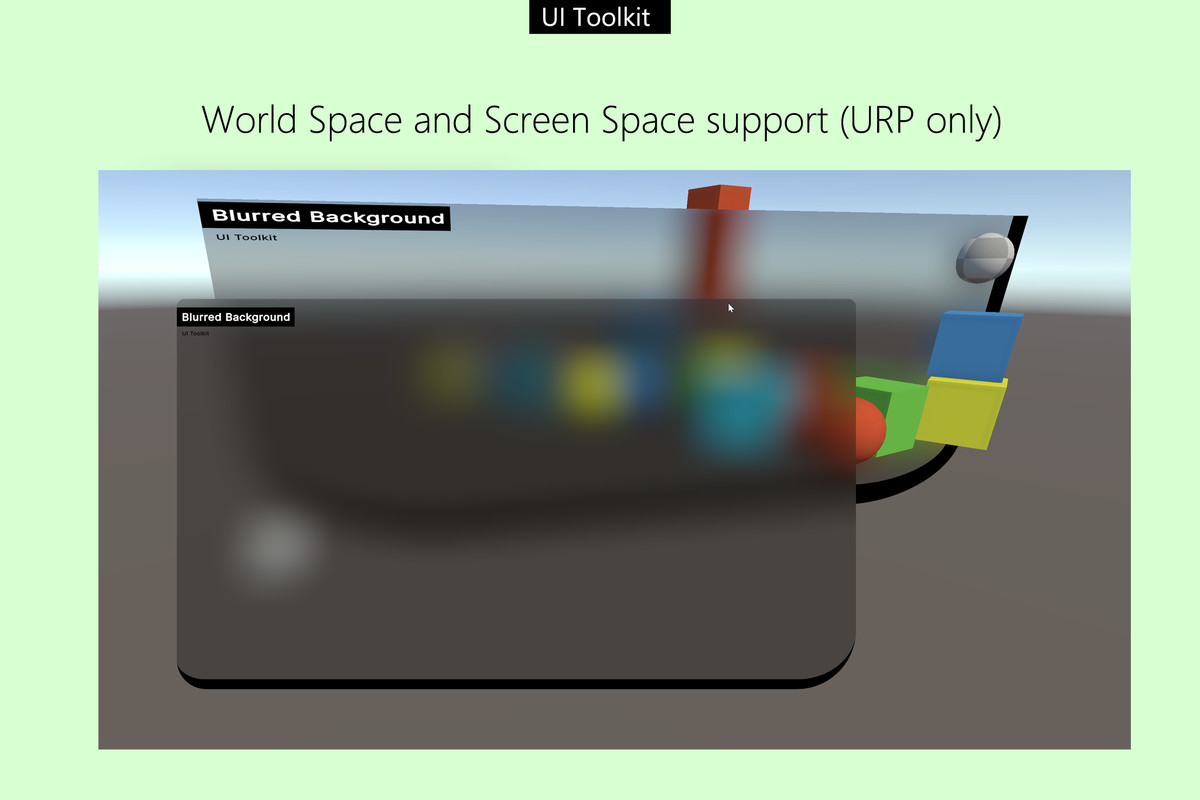
⚠️ The new "World Space" mode in Unity 6000.2+ or higher is only supported in URP.
⚠️ No anti-aliasing for rounded corners. It's a UIToolkit limitation, hopefully they will patch it some day.
⚠️ Built-In render pipeline will add a script component to your cameras to hook into the render process to generate the blurred image. The component is not saved in the scene. It will be created at runtime if needed.
⚠️ It assumes forward rendering. If you are using deferred rendering then it may not work (it's untested on deferred renderers).
⚠️ URP 2D projects are not officially supported (if you are using the Universal Render Pipeline with the 2D Renderer). It worked in some test scenarios but it was not broadly tested. Notice: normal URP projects are fully supported.
⚠️ NO VR Support: I have had reports that it is NOT working on a Quest 2 which leads me to believe it's not working in VR. You may get a blur but it will most likely be misaligned.
⚠️ No HDR: As of now HDR is not supported (HDRP is, just not High Dynamic Range rendering). Why? -> it’s complicated
✍️ Usage
1) Open the UI Builder Window
2) Add a new UIToolkitBlurredBackground element from the Library > Project > Kamgam section.
3) Done. No further setup is needed. It behaves just like any normal visual element.
😎 HINT 1:
The blurred background is drawn ON TOP of your regular background. Use alpha on the tint in combination with a bright background color to simulate some semi-transparent white glass.
🧐 HINT 2:
Try a low resolution for your highly blurred backgrounds. Doing that you can save some resources. Better spend those fps elsewhere!
🤠 HINT 3:
If you want to disable the blur completely then set the blur iterations or the blur strength to 0. This will disable the effect.
🤓 HINT 4:
Keep the "Blur Iterations" as low as possible (1 is ideal). Iterations can increase the quality by but they are also the most expensive setting you can use. Better use that quality settings instead.
🤫 HINT 5:
The blur is rendered (extracted) once per frame from your already rendered color buffer. This means it has very little overhead and it does not matter how big your blurred UI is.
🥳 HINT 6:
In Unity 6.3 use a low blur value (like 0.1) to make any filter effect the blured content. This trick can be used to apply a UI blur filter to the UI that includes the scene (which it normally wouldn't). Oh and this does not only work for the blur, it works for all filters. Enjoy :-)
☎️ Support
If you have any questions please write to office[at]kamgam.com. Please be patient, replies may take a few days. Please include your Asset Store Order Nr and Unity version in your request. Thank you.
❤️ If you like this asset then maybe you'll like these too:
📄 UI Toolkit Script Components
Link script components to your UI
Separate your assets into useful parts within seconds.
One Settings UI + API for all render pipelines.
Release Notes
v1.4.1
* Added auto resolution for missing shaders in case the shader auto import fails after installation in Unity .6.3+ URP.
v1.4.0
* Added multi blur strength, resolution, quality and iteration support.
NOTICE: This also means the global (BlurMananger.Instance.*) properties now no longer have any effect since they are managed on a per image level.
v1.3.2
* Custom Pass duplication fix (in Editor) for HDRP. Thanks to Michail for reporting it.
v1.3.1
* Unity 6.3 Filter compatibility update. Hint: Combine this with a low blur value and the blur filter (new in Unity 6.3) -> Result: blurred UI over UI + blurred scene background. More details in the manual. Enjoy :-)
v1.3.0
* Added WorldSpace support for Unity 6.2 and 6.3+ (URP only)
v1.2.5
* Fixed URP shader in PlayStation 5. Thanks to Jonas!
* Improved shader performance a tiny bit on certain hardware for all render pipelines.
* Added static IgnoreBlurredBackgroundColor property which you can enable to ignore the backgroundBlur color (uses the default backgroundColor instead).
v1.2.4
* Fixed iterations not working properly in Render Graph
* Fixes for the shared blur settings (disabling elements is now taken into account automatically)
* UI Builder Lifcycle improvements
* Built-In fix for deallocation outside of main thread.
* Fixed NullRef upon first import in Unity 6 URP with render graph (had no negative impact before but it was not a good first impression).
* Added public "BlurredBackgroundElements" to BlurManager for easy access to all blurred images.
Thanks to Sam for reporting and providing repro samples for most of these :-)
v1.2.3
* Added [SerializeField] to attributes for Unity 2023.2+ to enable binding. Thanks to Kévin for suggesting this.
* Added USS styling support, see manual (--blur-strength, --blur-iterations, ...)
v1.2.2
* Fixed asset root folder dection causing errors during build, my apologies.
v1.2.1
* Fixed an error if the user moved the asset root after installation.
v1.2.0
* Fixed support for transforms (scale, rotate, translate). Thanks to Victor for reporting this.
v1.1.1
* Unity 6 Compatibility Update. Now all RPs are supported in Unity 6 (Render Graph).
* Fixed render side-effects in BiRP (thanks to Young for reporting these). It now uses render buffers instead of on-camera rendering (event forwarder was removed).
v1.0.6
* Fixed URP Blur not rendering if no camera had the "MainCamera" tag. Now it will use the first the first camera that does not have a render texture in case there is no main camera.
* Improved: No more memory allocations during camera discovery. This is now GC free after the initial allocation.
* Improved: HDRP dynamic camera change support and camera stacking support.
* Fixed/Improved Auto-Install process
v1.0.4
* Fixed a breacking API change 2023.1 > 2023.2 in URP (_BlitTexture_TexelSize already defined error). Thanks to Joscha for reporting it.
* Fixed Assert Error & Null Pointer in URP Renderer if multiple render texture cameras were used.
* URP now supports cameras without the MainCamera tag.
v1.0.3
* Fixed "InvalidCastException" in Unity 2023.1.15f1
* Fixed deprecation warnings in Unity 2023.
* Improved Mouse Look in Demo (now it starts in the center).
v1.0.2
* Fixed a profiler scope error on mac (thanks to Joscha for reporting it).
v1.0.1
* Initial release, yay!


Basic Information
- Latest Version
- 1.4.1 (02 Mar 2026)
- Publisher
- KAMGAM
- Category
- Textures & Materials/GUI Skins
- Size
- 0.7 MB
- Price
- €27.59
- Asset Rating
- ★ ★ ★ ★ ☆ (11)
Extended Information
- Unity Versions
- 2021.3.35
- Render Pipelines
- ✔ BIRP ✔ URP ✔ HDRP
- State
- Published