UGUI MiniMap
UGUI MiniMap is a complete and user-friendly MiniMap/WorldMap solution for Unity, utilizing the UGUI system. It's versatile and can be integrated into any game genre, including Racing, FPS, RPG, RTS, and more.
Get started quickly by simply dragging and dropping one of the minimap presets into your scene, assigning the main player in the inspector, and you're done.
This fast and powerful system works seamlessly on all platforms, including mobile devices. Using Picture mode, you can bake your map with the included automated bake tool, allowing you to render the entire map with just one draw call. For larger maps, the bake tool supports cluster baking, enabling highly detailed image rendering with minimal performance cost.
Get Started Video | Discord | Preview
Key Features:
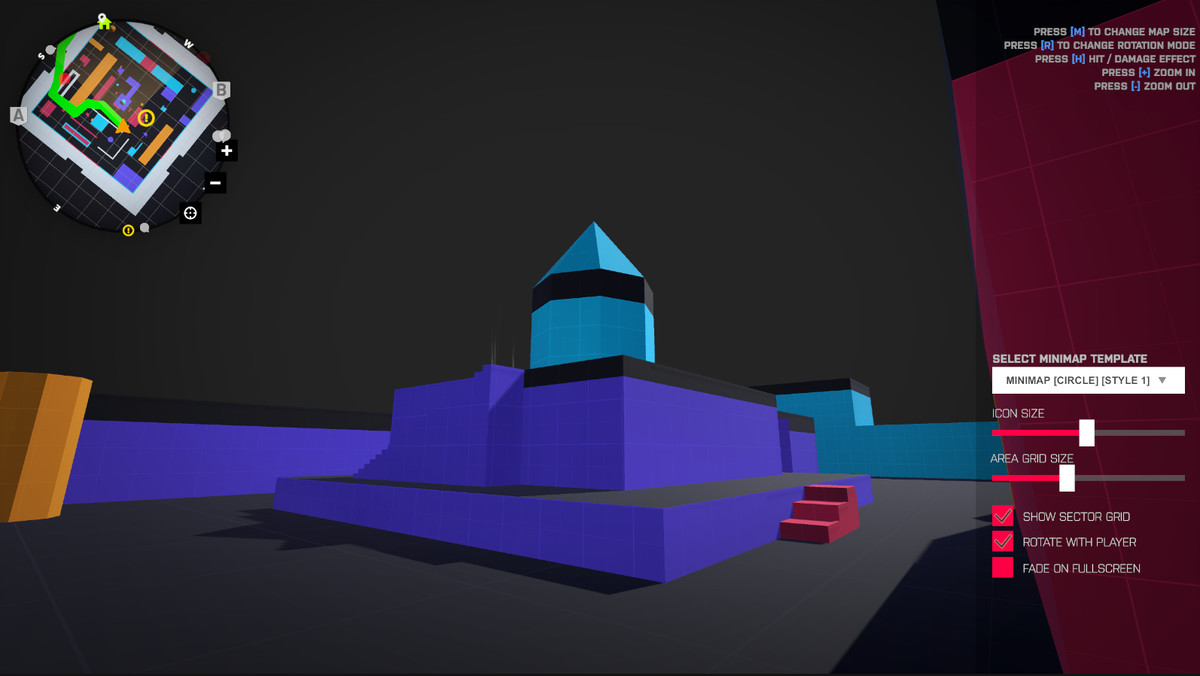
- Square and Circle Mini Map shape.
- RealTime and Picture Render Mode.
- Support for Build-In, URP, and HDRP.
- NEW: Support for cluster bake render for big maps.
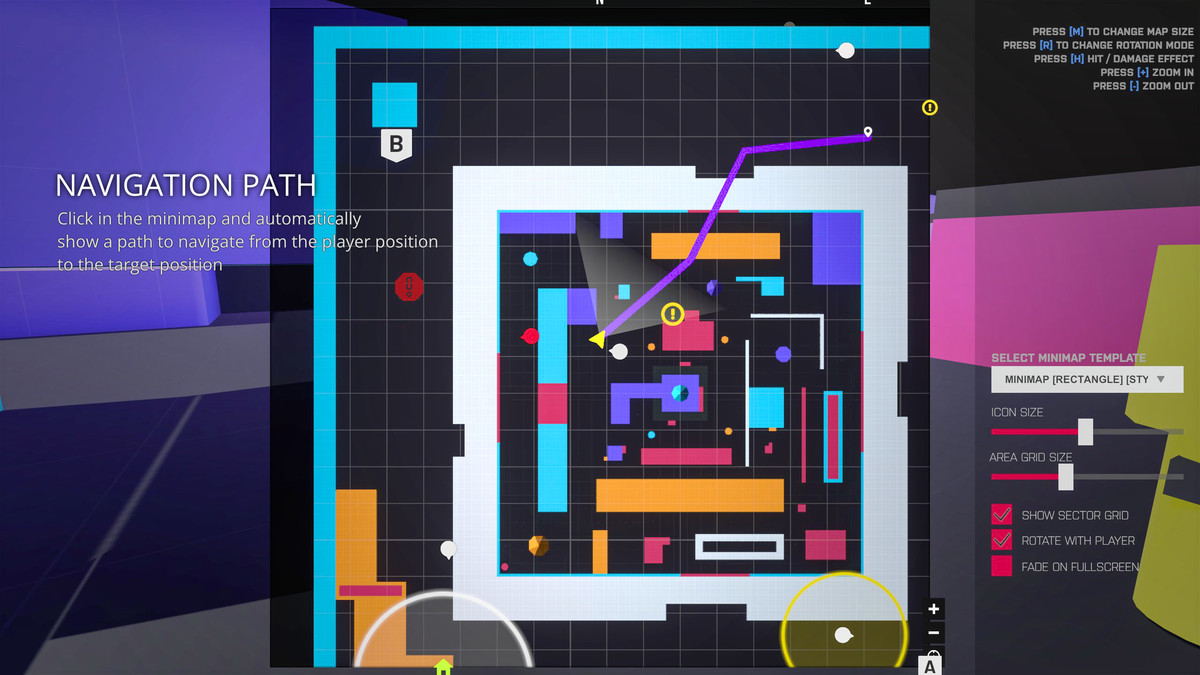
- NEW: Navigation Path.
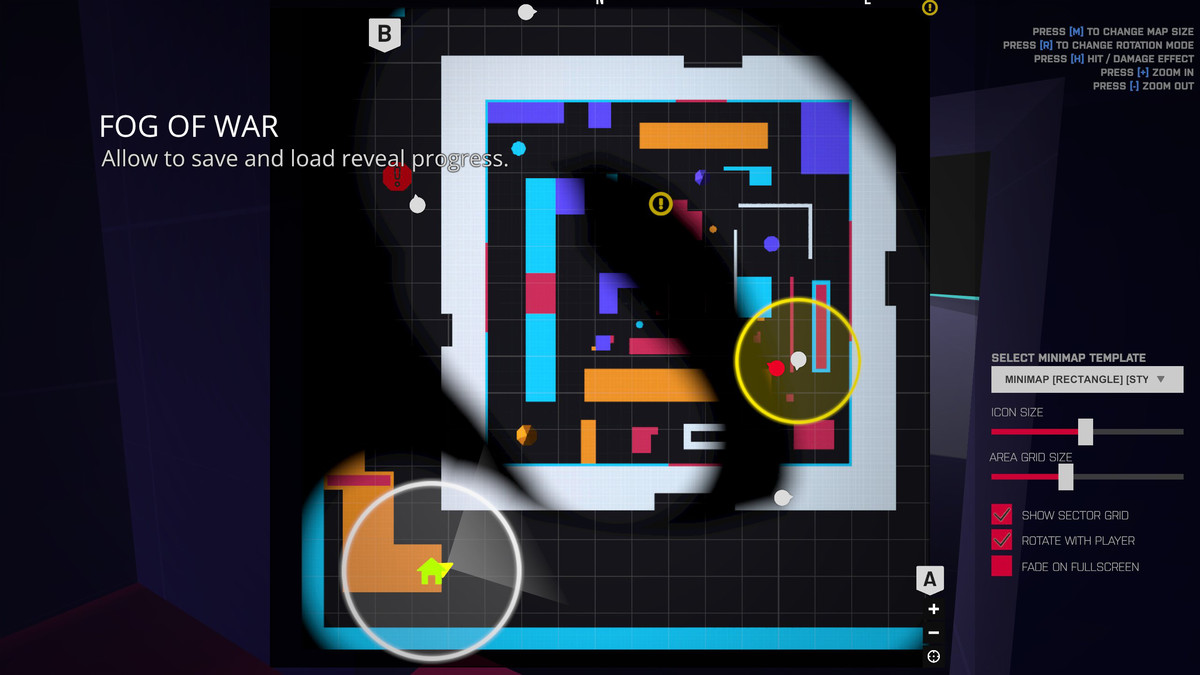
- NEW: Fog of War.
- Bake map render for performance.
- Optimized for Mobile platforms.
- Fullscreen map transition.
- Fullscreen map navigation and zooming.
- Easy to reskin using only UGUI Images.
- Compass Bar.
- Border Icons.
- World map point markers.
- New RTS Camera Movement.
- Circle Border icons.
- Sector Grid.
- 3D and 2D Mode.
- Static or Dynamic rotation map.
- Hit / Damage Effect.
- World Map and Minimap
- Static Map mode.
- Circle Area for each icon.
- Support custom map masks.
- Create Waypoints / Icons easily in runtime.
- 2D Example scene.
- Panning Tweening.
- HoofdPunt indicator.
- Zoom In and Out.
- In Editor documentation.
- Easy to use (Drag and Drop).
- Customize icon color, size, sprite, etc.
- Animated Icons.
- Zoom Levels.
- Clean code - C#.
- Well commented.
Release Notes
2.8.1
- Fix: Fog of War in URP not working.
2.8.0
#Added
- Added Fog Of War system, allowing to hide the minimap and reveal areas where the player pass.
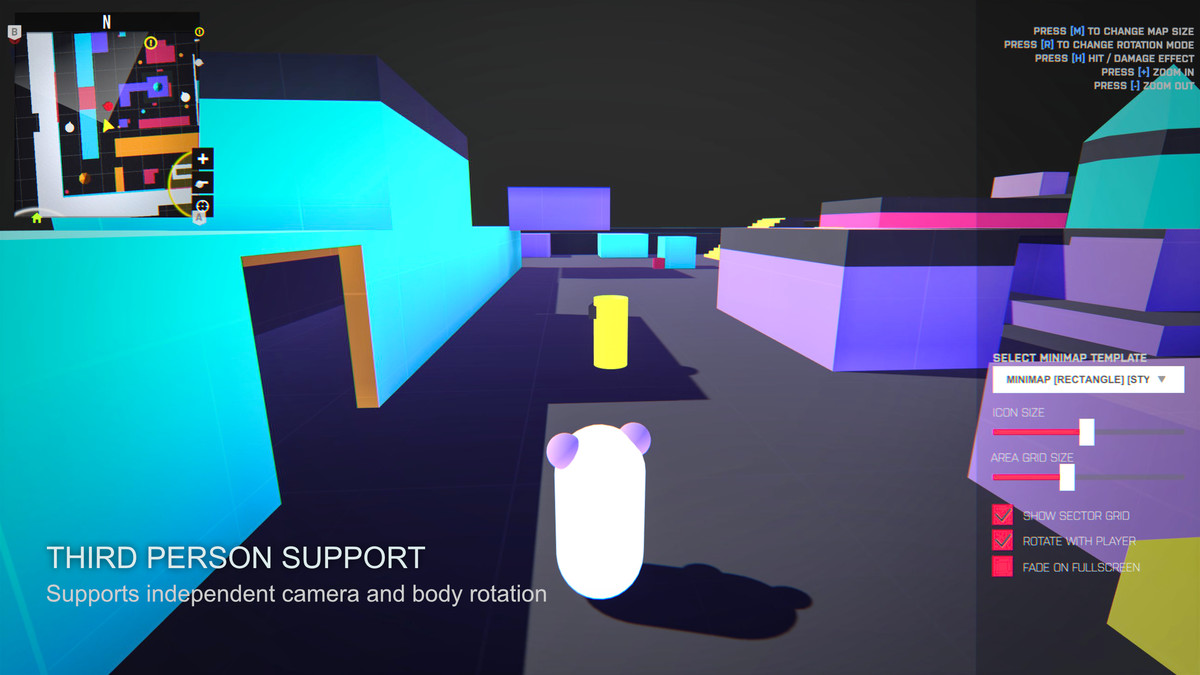
- Added a new minimap rotation mode 'Rotate Map And Player' which better fit the map rotation in third person games.
- Added a Third Person scene example.
- Added a scale mode for the icons, size delta and transform scale, this last one useful for icons with text content.
#Improvements
- Distribute in separate frames the icon updates to avoid doing the calculation in a single frame.
- Made multiple micro optimizations to the whole system for better performance.
- Improve zoom icons consistency during the zoom transition to fix the size jittering.
- Improved the minimap screenshot baker tool adding an option to bake the grid with customizable options.
#Fixes
- Fix an error with 'bl_MiniMapTarget.cs' causing the minimap not pick the target in runtime if the minimap is loaded after the player.
2.7.1
#Added:
- Support for separate position and rotation target tracking (for third-person games).
#Fixes:
- Fix issue that prevent vertical panning in the fullscreen minimap.
2.7.0
Raise minimum Unity version to 2022.3
#Added:
- Added Path Navigation system, now you can set a path for the player to follow in the minimap when the player clicks on the minimap.
- Added option for icons size be relative to the minimap zoom level, so the icons cover the same area in the minimap regardless of the zoom level.
- Added option in bl_MiniMap to easily tweak the minimap UI background color and opacity.
- Added option to easily change between the RenderTexture resolution in the inspector of bl_MiniMap.
#Improvements:
- Remove obsolete code in Unity 6.
- Now multiple layers can be ignored by the minimap camera instead of just one.
- Now the UI Mask shader support transparency from the alpha channel of the texture.
- Tweak the default minimap prefabs settings for better performance with virtually no visual differences.
- Addded option to enable/disable the minimap icons with the transform target of the icon.
- Added more optimization options in the bl_MiniMap inspector.
#Fixes
- Fixed incorrect positioning of minimap icons in non-square minimap shapes.
2.6.0
#Added:
- Added option in MiniMap Entities to set custom click events for each entity.
- Added HDRP shader support.
- Added a new rectangle minimap prefab example showcasing a minimap with a different aspect ratio.
#Improvements:
- Make alot easier to set up the minimap for a different render pipeline by just changing a popup field.
- Now minimap pointers can be canceled by the player when the player clicks on them in the minimap.
2.5.1
#Added:
- Added option to set an offset rotation angle to the minimap camera when the map doesn't rotate with the player.
#Fixed:
- Fixed build compilation error cause by an editor script.
2.5.0 (Not Compatible with previous versions)
#Added:
- Add icon opacity based on distance from the minimap target.
- Add new fullscreen modes: Auto Scale To Fit Screen and Auto Scale To Cover Screen.
- Overall minimap UI opacity setting in the inspector of bl_Minimap
- Add option to automatically calculate map bounds based on the scene meshes from the inspector of bl_MiniMapBounds.cs
- Add Map icon presets so various minimap entities can share the same icon settings.
#Improvements:
- Improved example scene with more icon examples.
- Better minimap resize procedural animation transition.
- Map pointers now use a particle effect instead of a static mesh.
- Now is possible to override the icon face direction option per icon or use the global setting.
- Allow zooming in/out with the mouse scroll when the pointer is over the minimap.
#Fixes
- Player vision area UI render on top of the player icon.
- Minimap icon rotations were affected by the player's look direction, an issue introduced in the last update.
- Fix errors when the legacy input system is not enabled.
- Fix icons jitter movement when the minimap is transitioned to fullscreen or vice versa
- Fix other minor bugs that did happen in very specific scenarios.
- Fix the wrong rotation of the icons when the icons are set to rotate with the target in 3d minimap mode.
- Fix couldn't navigate in the fullscreen minimap of the circle minimap prefab.
2.4.3
-Fix: Minimap marks keep working even after disabling the feature in the bl_MiniMap inspector.
-Fix: Minimap drag navigation didn't work on touch screen devices.
2.4.2
-Fix: Circle Minimap mask appear black in OpenGL 3.0 and Metal Graphic API's
2.4.1
-Fix: MiniMap orthographic prefabs in the 2D scene.
2.4
-Improve: Add Custom Mask Shader, now minimap shapes edges (e.g in circular maps) are much smoother.
-Improve: Minimap rotation, now the small rotation jump that happens when the player is oriented to the north doesn't happen anymore.
-Improve: Add more icons and shapes to the package.
-Improve: Now the MiniMap Entity and MiniMap Icon scripts are inheritable to allow modifying and extending them easier.
-Improve: The default MiniMaps prefabs.
-Fix: Minimap static icons jump to the border of the minimap randomly.
-Add: No-Render layer option in order to allow set up a certain layer that the minimap won't render (for Realtime MiniMap only).
-Improve: Overall performance and less memory allocation.
2.3
-Change: Unity 2019.4 minimum version.
-Improve: Added support for Picture mode in Orthographic minimaps in a vertical orientation (for 2D Games).
-Improve: Picture creator, now you can preview the screen borders in the Game View window before taking the screenshot.
-Fix: The position offset was not exposed in the inspector of bl_MiniMapItem.cs
-Fix: Issue that causes Picture mode minimap doesn't show if the 'ShowGrids' toggle was turned off.
2.2.7
-Fix: Minimap is not rendered at certain heights.
-Improve: Use custom shader for Picture mode map for performance and better looking.
-Improve: Add support for Universal Render Pipeline.
2.2.5
-Fix: Circular compass was showing the inversed coordinates.
2.2.4
-Fix: Orthographic mini map prefab.
-Fix: bl_MiniMap.Target is readOnly.
-Improve: Remove warnings about unassigned private fields in Unity 2018.3++
-Improve: In-Editor documentation skin in Unity Personal.
2.2
-Improve: Text tooltip, now the background of the text will be automatically scaled depending on the string length.
-Improve: Add interact options, now you can select if the icon is interactable if it's how? OnHover or OnTouch.
-Improve: Improve performance by changes made in the way that icons are updated.
-Improve: added custom update rate in bl_MiniMap.cs inspector, useful for mobile platforms (1 = normal Update rate)
Version 2.1:
-Improve: Update the documentation and integrate with Unity Editor (Windows -> MiniMap -> Documentation)
-Improve: Screen shot tool system.
-Fix: Icons was not masked when 'Show Icon OffScreen' was off, causing icons show outside of the minimap UI.
-New version require Unity 2017.4++ (old version still will be available for Unity 5.6 - Unity 2017.3)
-Improve: Editor inspector scripts.
-Improve: Now can add the player icon in bl_MiniMap -> Render Settings -> Player Icon, instead search the Image Component for add it.
-Fix: Minimap icons what not working if you change the anchor pivot of the MiniMap UI root rectTransform.
-Improve: You not longer need to assign the Item prefab for each bl_MiniMapItem script that you set up, this will take automatically.
-Fix: Error in the compass when there's not main camera in the scene.
-Fix: Error when use Realtime mode but there's not a minimap texture assigned (which should not interfere because is not needed).
Version 2.0:
New: Now can get an world position from the minimap.
Add: World Point Markers, player click one point on the mini map and a marker will appear on the world map, it will disappear when player yet close to it.
Improve: Clean code and improve performance.
Improve: Add custom inspector for bl_MiniMap, now is easy to find and understand the settings.
Version 1.9
Add: Areas / Sectors Grid.
Fix: small issue with level name UI.
Fix: MiniMap now show if disable on start or awake.
Add: North hoofdpunt icon indicator.
Version 1.8.8
Fix: Example Scene crash in Unity 5.5++
Fix: Compatibility issues with other Lovatto Studio's assets.
Add: FadeIn on start effect.
Add: Option (bool) in bl_MiniMapItem.cs -> DestroyWithObject, for destroy the icon in the mini map when the object to follow is destroyed.
Add: Option (bool) in bl_MiniMap.cs -> FadeOnFullScreen inspector for do an fade in effect when change to full screen or mini map.
Update: to SceneManager.
Version 1.8.5
- Add 2D scene example.
- Improved: system to use in 2D games.
- Fix: After hide icon and show again this have color alpha = 0.
- Improved: Now you can get the reference of item create when call the function bl_MiniMap.CreateNewItem(); in runtime.
Version 1.8
Add: Circle Area for icons.
Add: Now you can setup a circle area for each minimap item configure the radius and color for show in the mini map.
-Fix: Emission color in picture mode.
-Add: MapType (Target and World) options.
-Add: World maptype option for show a static map of whole world.
-Improved: Now icons rotation is correct to the target rotation.
-Add: Global icon size multiplier in bl_MiniMap for change the size of all icon (even in runtime) with a variable.
Version 1.7.4
- Improved: Now you can set target in runtime with: bl_MiniMapUtils.GetMiniMap().SetTarget(Target);
Improved: Now you can change the Minimap texture (picture mode) in runtime with: bl_MiniMapUtils.GetMiniMap().SetMapTexture(YourTexture);
Improved: Now you can change the icons of minimap items in runtime with: bl_MiniMapItem.SetIcon(IconSprite);






Basic Information
- Latest Version
- 2.8.1 (18 Mar 2026)
- Publisher
- Lovatto Studio
- Category
- Tools/GUI
- Size
- 3.9 MB
- Price
- €13.8
- Asset Rating
- ★ ★ ★ ★ ☆ (118)
Extended Information
- Unity Versions
- 2022.3.62
- Render Pipelines
- ✔ BIRP ✔ URP ✔ HDRP
- State
- Published